Microsoft Flow - Send Email when there is no Exchange Online
Microsoft Flow provides a great way to automate workflow on SharePoint Online. One of the key functionality required to create a successful automation is the ability to notify or email users. Microsoft Flow provides this through the 'Office 365 Outlook' connector. But
Office 365 Outlook connector will not work if your mail boxes are not on Exchange Online.
Lot of organisations are still not on Exchange Online, but are actively using their SharePoint Online Platform - And not having email capabilities is a blocker for leveraging the capabilities provided by Microsoft Flow for SharePoint automation.
Use SharePoint Online Email Capability
SharePoint Online does provide basic email capabilities - this is the same set of functionality that SharePoint Online uses to send email when you for e.g. share a document with someone else. Developers can get access to these features through the SharePoint Online REST endpoints.
Basic idea here is to use the SP.Utilities.Utility.SendEmail REST operation to send email from a Microsoft Flow.
Getting started
What we will try and do is to send an email using Microsoft Flow to a specific user when a file is uploaded to a SharePoint Document Library.
For this we create a Flow trigger event based on a file creation event.

Next we add the Send HTTP Request to SharePoint Action.

Set the Uri to SP.Utilities.sendEmail
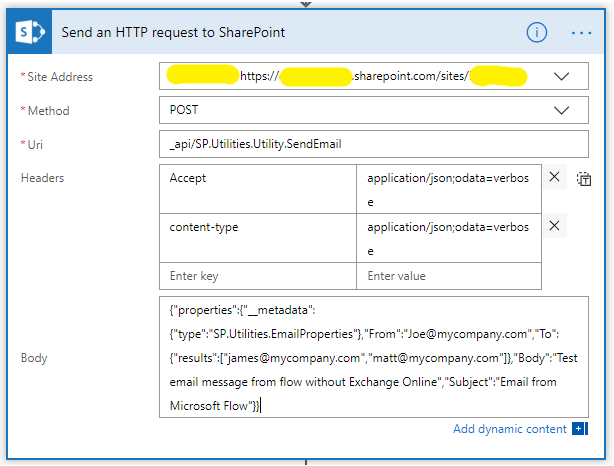
- Site Address: Set this to the SharePoint Site URL
- Method: POST
- Uri: _api/SP.Utilities.Utility.SendEmail
- Headers:
- Accept = application/json;odata=verbose
- content-type = application/json;odata=verbose
- Body:
{"properties":{"__metadata":{"type":"SP.Utilities.EmailProperties"},"From":"[email protected]","To":{"results":["[email protected]","[email protected]"]},"Body":"Test email message from flow without Exchange Online","Subject":"Email from Microsoft Flow"}}
That's it! The highlighted sections within the JSON in the "Body" section can be updated using Dynamic content from your Microsoft Flow steps.
Result
On triggering the flow, an email is sent successfully to the accounts configured in the SharePoint HTTP action.

Points to Note
Since the email are being sent using SharePoint REST End point
- Email will be from [email protected], just the display name will be the sending users display name.
- Can only send email to valid users on the same Office 365 Tenant.