NonBifurcatingAccessScope - Block email thread

Microsoft Purview Data Loss Prevention(DLP) policies in Microsoft 365 provides a rich set of capabilities to prevent loss of sensitive data from Microsoft 365 environment including Exchange Online emails.
One of the action that I have used regularly within deployments is the "Restrict access or encrypt the content in Microsoft 365 location" and the configuration looks like this:
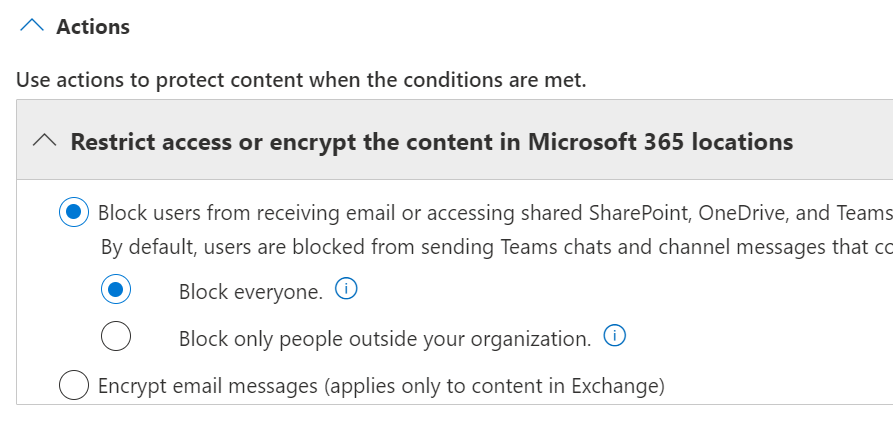
If you are configuring a DLP rule that apply to emails, the above configuration can be a bit misleading depending on how you interpret it.
You might expect that by selecting the "Block everyone" option an email thread is blocked for all recipients of the email. However, this is not the case.
To understand the details, hover over the information icon located near the setting.
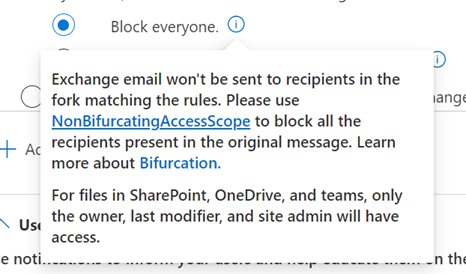
The email will be blocked only for those recipients on the email thread for whom the defined conditions match.
The implications from a user experience perspective is
- Some users on an email conversation will receive the email and some won't
- Sender will receive NDR for failed messages
- The sender now seeing the NDR can addressed the reason for the failure and resend the message, but this has now created multiple email conversations as people who received the original message have a different email.
The DLP rule can be adjusted to handle this differently by setting the configuration through PowerShell command and specifying the NonBifurcatingAccessScope parameter.